Risemi
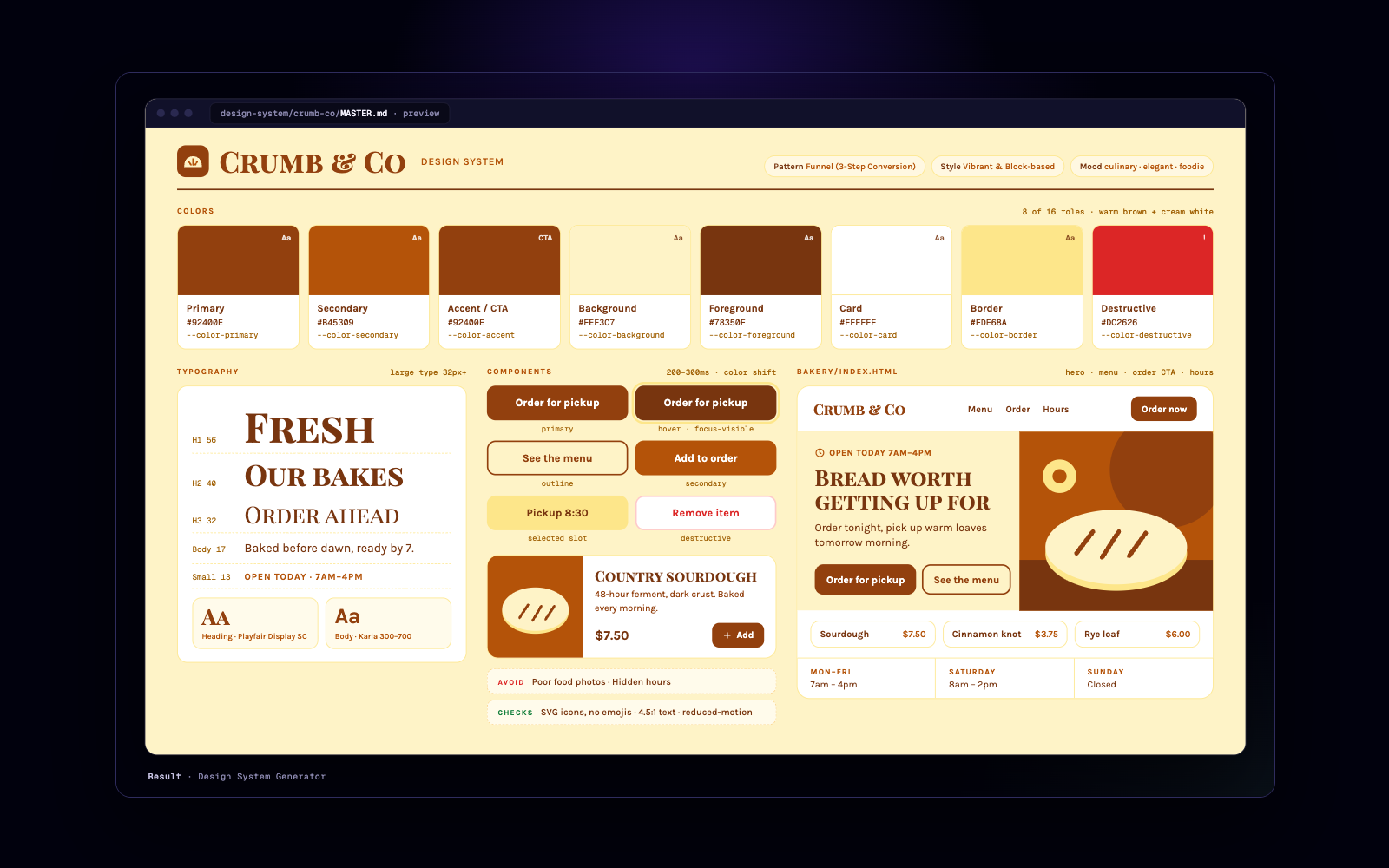
Crumb & Co design system the skill generated, with the bakery home page it built
You say
use design-system-generator to set up a design system for a neighbourhood bakery with online ordering (Crumb & Co), save it as MASTER.md, then build the home page as bakery/index.html
Skillv1.0.0

Design System Generator

One-line brief in, full design system out: page pattern, style, colour tokens, font pairing and anti-patterns from a local database.

No ratings yet0 installs0 savesupdated 7 nov

Install in your agent

Read https://risemi.io/p/design-system-generator/install.md and follow it to install the "design-system-generator" skill into this agent.

Paste this into Claude Code, Cursor, Codex or any agent that can read a URL.

Full guide for your agent: https://risemi.io/p/design-system-generator/install.md

What you get

  • A SKILL.md workflow: read the brief and stack, generate the design system, verify the match, then build
  • A local database: 192 product profiles with reasoning rules, 80 styles, palettes with semantic CSS variables, 74 font pairings, landing patterns
  • Persisted MASTER.md plus per-page overrides so every later session uses the same decisions
  • Focused searches for UX rules, charts, icons, GSAP motion and 22 stacks (React, Next.js, SwiftUI, Flutter, shadcn and more)
  • No API key or network: Python 3 standard library only

Good fit

  • Founders and developers starting a new product or page with an agent
  • Designers who want token-level output (CSS variables, font imports) they can review
  • Teams that want design decisions written down once and reused

Not for

  • Products that already have a mature design system; use it instead
  • Environments without Python 3

About this skill

Design System Generator

Starting a new product with an agent usually means accepting whatever palette and fonts it reaches for first. This skill makes the first step a lookup instead of a guess. You give a one-line brief ("neighbourhood bakery with online ordering, warm"), and a local Python script matches it against a curated database: 192 product types with reasoning rules, 80 UI styles, palettes with full semantic tokens, 74 font pairings, landing-page patterns and the anti-patterns for that category. The result is a design system the agent then builds with: page pattern and section order, style, a colour table with CSS variables (primary, on-primary, accent, background, muted, border, destructive, ring), heading and body fonts with the Google Fonts import, key effects, what to avoid, and a pre-delivery checklist.

How it works. The agent reads your brief and your stack (from package.json, pubspec.yaml and similar), runs scripts/search.py "<brief>" --design-system, checks the match fits your product, and only then writes code. Add --persist and the system is saved as design-system/<project>/MASTER.md, with optional per-page overrides, so later sessions build from the same decisions. Three optional dials tune the output without changing the brief: variance (minimal to bold), motion (attaches a matching GSAP snippet) and density (spacious to dashboard spacing). For focused questions the same script searches one domain (ux, color, typography, chart, landing, icons, gsap) or one of 22 stacks (React, Next.js, Vue, SwiftUI, Flutter, Tailwind, shadcn and others).

Why it is worth having. The data is local, deterministic and inspectable: no API key, no network, and the agent is told never to present an empty search as a real match. You get the same answer twice, and you can open the CSV to see why.

Based on UI/UX Pro Max by Next Level Builder (MIT): https://github.com/nextlevelbuilder/ui-ux-pro-max-skill

What we changed

  • Renamed the skill to design-system-generator and added one sentence to the description about generating a design system from a brief.
  • Replaced the Claude Code plugin variable in all 11 script commands (${CLAUDE_PLUGIN_ROOT}/.claude/skills/ui-ux-pro-max/…) with <skill-dir>/scripts/search.py plus a line telling the agent how to resolve it, so the commands work when the skill is installed as a plain folder in any agent. The commands call python3, not python, because a stock macOS has no python.
  • Packaged only the main skill with its data, references and scripts; left out upstream's tests and its other sub-skills. NOTICE.md lists the upstream commit and every change.

Known limits seen in our run: the script's output headers print upstream's name ("UI Pro Max Search Results"); the style and page pattern the search picks can fit a brief poorly even when the palette and fonts fit (a bakery brief got a warm bakery palette and font pair but a "Vibrant & Block-based" style meant for startups), so read the match before building; and MASTER.md's header names design-system/pages/ while the real folder is design-system/<project>/pages/.

Checked against

Claude Code 2.1.317 (desktop app, Claude Opus 5.5), 2026-11-07. Installed under .claude/skills/design-system-generator/, loaded from SKILL.md and run end to end on a bakery brief: search.py --design-system --persist wrote MASTER.md, a --stack html-tailwind query answered, and the home page was built from the tokens. The script's headers print upstream's name, and the style it picked fit the brief poorly while the palette and fonts fit; the stale python line and an empty heading were fixed (NOTICE.md). The example output on this page is from that run, shortened. Not yet checked: automatic triggering from the skill description in a fresh session (the run started from an explicit request), and Codex, Cursor, GitHub Copilot and Gemini CLI, which read the same SKILL.md format but have not been run.

How to install

Copy the contents of files/ to .agents/skills/design-system-generator/ in your project (the shared skills folder) and to .claude/skills/design-system-generator/ (Claude Code), or download the zip and unpack it there. If your agent uses its own folder (.cursor/skills/, .github/skills/, .gemini/skills/), copy it there too. Check that python3 --version works, then ask: "use design-system-generator to set up a design system for …".

Not affiliated with Next Level Builder.
Similar products

Project: fresh `npm init -y` + `npm i -D vitest typescript` (Vitest 5.1.0, TypeScript strict). Every runner output below is pasted from the actual run.

Behaviour list (simplest first): 1. returns empty for blank input · 2. returns the address trimmed and lowercased when valid · 3. returns malformed when there is no @ · 4. returns malformed when there is more than one @ · 5. returns malformed when the domain has no dot · 6. returns too_long when the address is over 254 characters

Cycle 1: returns empty for blank input

```
[TDD] cycle 1/6  step RED  behaviour: returns empty for blank input
test:    src/validateEmail.test.ts > validateEmail > returns empty for blank input
ran:     npx vitest run src/validateEmail.test.ts -t "returns empty for blank input"
result:  FAIL  Error: Cannot find module './validateEmail' imported from <project>/src/validateEmail.test.ts
reason:  right (the unit under test does not exist yet: missing function, not a typo in the test)
changed: src/validateEmail.test.ts (+8, new file)
next:    minimum code in src/validateEmail.ts
```

```
[TDD] cycle 1/6  step GREEN  behaviour: returns empty for blank input
ran:     npx vitest run src/validateEmail.test.ts -t "returns empty for blank input" --reporter=verbose; npx vitest run src/validateEmail.test.ts
result:  PASS  Tests 1 passed (1)
changed: src/validateEmail.ts (+9, new file: result types + hard-coded `{ ok: false, error: 'empty' }`)
next:    refactor
```

Refactor: no refactor (hard-coded return is forced into the general version by cycle 2).

[Cycles 2–6 follow the same shape: each RED shows a real assertion mismatch such as `Tests 1 failed | 1 skipped (2)`, each GREEN the passing count, with refactors in cycles 5 and 6.]

Done

```
[TDD] DONE  cycles 6  tests added 6  suite PASS
ran:     npm test   (vitest run)   and   npx tsc -p .
result:  Test Files  1 passed (1) | Tests  6 passed (6); tsc exit 0
pre-existing failures: none (no tests existed)
found, not fixed: the 254 boundary itself (exactly 254 chars accepted) has no test; it passes today, so a test would be green on first run. 'a@.com' and 'a@b.' are accepted because the spec only asks for a dot in the domain.
```

No-fake-green check before every GREEN: no `.skip`/`.todo`, no assertion weakened, no test-only branch, nothing mocked.
SkillCodeFree
  • Antigravity
  • Claude Code
  • Codex
  • +3
Coding

Red-Green TDD Loop

Use it to make your coding agent build every change test-first: one failing test, the minimum code, a refactor, and a status block after each step.

0 installs
Free
> Assumption: signed-in users read their own orders and create their own orders as `pending`; every status change after that is made by your server with the `service_role` key, never by the browser.

Audit: `public.orders` (about 1.8M rows)

Rule files applied: `security-rls-basics`, `security-rls-performance`, `security-privileges`, `schema-foreign-key-indexes`, `query-missing-indexes`, `query-composite-indexes`, `schema-data-types`, `schema-constraints`, `lock-short-transactions`, `monitor-explain-analyze`.

Findings, by rule (first 6 of 12)

| # | Severity | Rule | Finding |
|---|---|---|---|
| 1 | CRITICAL | `security-rls-basics` | `orders_insert ... with check (true)` lets anyone who can insert write an order for any `user_id`. Combined with finding 2, an anonymous visitor holding only your public anon key can create orders on behalf of any user. |
| 2 | CRITICAL | `security-privileges` | `grant select, insert, update ... to anon`. Orders belong to signed-in users, so `anon` needs no privilege at all. None of the three policies has a `to` clause, so each applies to every role, including `anon`. |
| 3 | HIGH | `security-privileges` | `authenticated` can `update` every column of its own rows: the owner can still run `update orders set status = 'paid', total_cents = 1` from the browser. |
| 4 | HIGH | `security-rls-basics` | The insert path also trusts `status`: a client can insert a row that is already `status = 'paid'`. |
| 5 | HIGH | `security-rls-performance` | All policies call `auth.uid()` bare, so it is evaluated per row. Wrap it as `(select auth.uid())` so it is evaluated once per statement. |
| 6 | HIGH | `schema-foreign-key-indexes`, `query-missing-indexes` | No index on `user_id`. It is the foreign key, the RLS filter column and the column every "my orders" query filters on. Each RLS-filtered select over 1.8M rows is a sequential scan. |

Fixing migration (file 1 of 2, excerpt)

```sql
set local lock_timeout = '5s';

revoke all on public.orders from anon;
revoke update, delete, truncate, references, trigger on public.orders from authenticated;
grant select, insert on public.orders to authenticated;

drop policy if exists orders_select on public.orders;
drop policy if exists orders_insert on public.orders;
drop policy if exists orders_update on public.orders;

create policy orders_select on public.orders
  for select to authenticated
  using ((select auth.uid()) = user_id);

create policy orders_insert on public.orders
  for insert to authenticated
  with check ((select auth.uid()) = user_id and status = 'pending');
-- No update or delete policy: denied for every role except service_role.
```

File 2 holds only `create index concurrently if not exists orders_user_id_created_at_idx on public.orders (user_id, created_at desc);` because `concurrently` cannot run inside the transaction the Supabase CLI wraps around each migration.

[The full answer continues with findings 7–12, the lock plan for 1.8M rows, the status and total_cents check constraints added `not valid` then validated, an `explain analyze` to run before and after, and one RLS test per role.]
SkillCodePro
  • Antigravity
  • Claude Code
  • Codex
  • +3
Coding

Postgres Rules for Supabase Projects

Use it to make your coding agent follow Supabase's 31 Postgres rules for RLS, indexes, schema and migrations before it touches your database.

0 installs
$9.99
Pack: `references/pack-product-shots.md`.

Three options

1. PS-09 Strawberry Milkshake Product and Infographic. A ready-made premium cold-drink hero shot: seamless pastel backdrop, realistic condensation droplets and "premium café advertisement" styling, which is exactly the look a chilled cold-brew can needs.
Prompt by @Strength04_X (𝐌), source: https://x.com/Strength04_X/status/2090665058980462697, via awesome-nano-banana-pro-prompts, CC-BY-4.0.

2. PS-02 Luxury Chocolate Ad Still Life. The only prompt in the pack that is a full ad layout with on-image copy, but you would have to delete its placeholder copy and invented logos and rebuild most of the props.
Prompt by @AiwithLucas_ (Lucas AI), source: https://x.com/AiwithLucas_/status/2089231817916420518, via awesome-nano-banana-pro-prompts, CC-BY-4.0.

3. PS-01 Premium Beverage Advertising Photography. Written for a beverage-brand hero ad and works from your attached references, but the prompt is only one line long, so lighting and composition would come from what you attach.
Prompt by @exywuu (Exywuu), source: https://x.com/exywuu/status/2092222318084788564, via awesome-nano-banana-pro-prompts, CC-BY-4.0.

Pick: PS-09

What to attach. Image 1: a clear, front-on photo of your real Northbound can, logo facing the camera.

Adapted prompt (4:5 Instagram ad)

Image 1: product photo of the Northbound cold-brew coffee can. Use this exact can.

A vertical 4:5 Instagram feed ad. A high-quality professional product photograph of a premium cold-brew coffee can, the 330 ml matte navy aluminium can from Image 1 with its white logo, standing upright and centered against a soft pastel pink seamless studio background. Preserve the can's exact shape, proportions, matte navy finish, white logo and label from Image 1; do not redesign it, recolour it or add any new graphics to it. The can sits on the same seamless surface with a few clear ice cubes and a small scatter of dark roasted coffee beans at its base. Realistic condensation droplets cover the can with soft reflections from the studio lights. Elegant soft lighting creates subtle natural shadows beneath the can. The can fills about 55% of the frame height in the lower two thirds of the image, logo facing the camera.

Text: the headline "Cold. Bold. Northbound." across the top third of the image, centered, in a bold clean white sans-serif with generous letter spacing, large enough to read on a phone. Render this headline exactly once, spelled exactly as written. Apart from the can's own logo from Image 1, no other text, no prices, no taglines, no extra logos, no watermark.

Ultra-sharp focus, DSLR macro beverage photography, premium café advertisement style, hyper realistic, clean commercial composition, 8K.

Tool settings: aspect ratio 4:5; in AI Studio or the API also set the output resolution to 2K so the headline stays sharp.

Prompt by @Strength04_X (𝐌), source: https://x.com/Strength04_X/status/2090665058980462697, via awesome-nano-banana-pro-prompts, CC-BY-4.0. Adapted: subject swapped from a strawberry milkshake in a glass to the Northbound can, Image 1 reference and preserve-the-product line added, 4:5 aspect ratio and headline added, the original's second (infographic) paragraph removed.

[The full answer ends with a one-fix-per-turn table for headline contrast, product drift, garbled text and framing.]
SkillImagesPro
  • Gemini
  • Nano Banana
Design

Curated Prompt Library for Nano Banana Pro

Use it to pick a provenance-checked Nano Banana Pro prompt and adapt it to your product, portrait or poster in one pass.

0 installs
$9.99
Assumption: no n8n-MCP server is connected in this session, so I took the skill's fallback path: I wrote the workflow JSON directly from the bundled rules and checked it by review (a rule-check script plus a dry run of every expression). The real validator (`validate_workflow`) was not run, and nothing was deployed.

How the skill routed this

| Step | Sub-skill used | What it decided |
|---|---|---|
| Shape | `n8n-workflow-patterns` | Webhook processing pattern: Webhook, then Validate, then Action, then Respond |
| Node parameters | `n8n-node-configuration` | Slack post needs a channel and text. `responseMode: "responseNode"`. `options.responseCode` set on every Respond node. UUID node ids, no placeholder credentials |
| Expressions | `n8n-expression-syntax` | Webhook data lives under `.body`. Use `$('Webhook').item.json.body.*` once past the IF node. `=` prefix on every expression field |
| Error paths | `n8n-error-handling` | Slack gets `onError: "continueErrorOutput"` and its `main[1]` is wired to the 500 responder. `retryOnFail` is on. Bad input is caught upstream and gets a 400 |
| Validation | `n8n-validation-expert` | Runtime-profile checks done by review. Security warnings get fixed (header auth on the webhook) |

```
Webhook ──> Validate Input ──true──> Post to #signups ──success (main[0])──> Respond 200 OK
                        └──false──> Respond 400 Invalid Input
                                     Post to #signups ──error (main[1])────> Respond 500 Slack Failed
```

Validation result (excerpt)

```
PASS  Webhook responseMode is responseNode (Respond nodes control the reply)
PASS  Every branch (success and each error) ends at a Respond to Webhook node: no hanging branch
PASS  'Post to #signups': onError=continueErrorOutput AND main[1] wired
PASS  'Post to #signups': retryOnFail with maxTries <= 5 and waitBetweenTries <= 5000
PASS  Every {{ }} field starts with = (no 'Expression requires = prefix' error)
PASS  Webhook fields read from .body, never $json.name / $json.email / $json.plan
…
43 passed, 0 failed
```

Expression dry run against sample webhook items:

```
valid           IF -> true  (Slack)  Slack text: New signup: Ana Lima (ana@example.com) on pro
missing_plan    IF -> false (400)
bad_email       IF -> false (400)
no_body         IF -> false (400)
500 body:   {"error":"upstream_error","message":"The signup was received but could not be posted to Slack. Please retry later."}
```

Not verified without the server: the node typeVersions (Webhook 2.2, IF 2.3, Slack 2.3, Respond 1.5) and the Slack v2 parameter names; confirm by opening the nodes after import.

[The full answer also holds the six-node list, the importable workflow JSON and the expressions table with the reason behind each one.]
SkillCodePro
  • Antigravity
  • Claude Code
  • Codex
  • +4
Coding

n8n Builder Skills for Coding Agents

Use it to have your coding agent build, configure and validate n8n workflows without the usual expression and node-config mistakes.

0 installs
$12.99
2. Tool design

| Tool | Does | Inputs (constraints) | Returns | Read-only / destructive | Errors the model can fix |
|---|---|---|---|---|---|
| `find_customers` | Customers whose name or email contains the text, case-insensitive | `query` string 1–100 (trimmed), `limit` int 1–50 = 20, `cursor` optional | id, name, email; `next_cursor` | read-only, idempotent | no match: try a shorter part of the name or the email domain |
| `list_customer_orders` | One customer's orders, newest first | `customer_id` int ≥ 1, `status` enum optional, `limit`, `cursor` | customer + orders; `next_cursor` | read-only, idempotent | unknown customer: call `find_customers` |
| `get_order` | One order with the customer's name and email | `order_id` int ≥ 1 | order + customer (structured) | read-only, idempotent | not found: check the number or list the customer's orders |
| `refund_order` | Sets a paid order to refunded | `order_id` int ≥ 1, `confirm` int optional, must equal `order_id` | updated order, `previous_status: "paid"` | destructive, idempotent | no `confirm`: preview, ask the user; order pending or already refunded; not found |

Checklist notes: one rule for empty results (an `isError` result with a next step), applied to every tool. All SQL is parameterized. Read tools use a read-only SQLite handle; only `refund_order` opens a writable one, and its `UPDATE ... WHERE id = ? AND status = 'paid'` is a single statement. The guard on the destructive tool is server-side (the preview/confirm step), not just the `destructiveHint` annotation.

3. Scaffold

From `templates/typescript-server.md`. Installed: `@modelcontextprotocol/server` 2.4.0, `@modelcontextprotocol/client` 2.4.0, `zod` 4.6.7; Node 24.6.0.

```
build-an-mcp-server/
  data/seed.sql, data/shop.db     3 customers, 5 orders
  src/index.ts                    stdio entry point
  src/server.ts                   createServer(): the four tools
  src/shop.ts                     SQLite client module (the system being wrapped)
  test/smoke.ts                   spawns the server over stdio, calls every tool
```

5. Test (Inspector CLI, eval loop layer 2)

```
$ npx @modelcontextprotocol/inspector --cli npx tsx src/index.ts --method tools/call --tool-name get_order --tool-arg order_id=1001
{
  "content": [{ "type": "text", "text": "Order #1001 for Ada Lovelace <ada@example.com>: $49.99, paid, created 2026-10-02T09:15:00Z" }],
  "structuredContent": { "order": { "id": 1001, "customer_id": 1, "total_cents": 4999, "status": "paid", "created_at": "2026-10-02T09:15:00Z", "customer_name": "Ada Lovelace", "customer_email": "ada@example.com" } }
}
```

Built, tested, not tested

- Built: four tools over `data/shop.db`, server-side preview/confirm guard on `refund_order`, smoke test, configs for Claude Code, Codex and Cursor, README.
- Tested: starter smoke (pass), full smoke test 14 checks (pass), strict typecheck (pass), Inspector CLI call (pass), seed database unchanged after tests.
- Not tested: the Inspector web UI by hand and the model check (running the five real requests through a live Claude Code session and recording which tool it picks).

[The full answer also holds `src/shop.ts`, `src/server.ts`, `test/smoke.ts` and the three client config snippets.]
SkillCodePro
  • Antigravity
  • Claude Code
  • Codex
  • +3
Coding

Build an MCP Server

Use it to design, build, test and ship an MCP server your agents use well: 3 to 7 well-designed tools, a tested starter and ready client configs.

0 installs
$12.99
Phase 1: Root cause investigation
Full suite: FAIL test_expired_coupon_rejected_twice (tests/test_checkout.py:16) AssertionError: Coupon(code='OLD50', …expires_at=2020-01-01…) is not None.
In isolation the same test fails at a different line (17): AssertionError: 50.0 != 100.0. So the first lookup in a process is rejected and every later lookup is accepted; in the full suite the first lookup was done by test_expired_coupon_rejected. Cross-test pollution through module-level state.
Cache probe at the boundary: cache before [] → 1st None → cache after ['OLD50'] → 2nd Coupon(OLD50). Docstring says the cache was added in 3f2a1c9 "to cut DB reads": that is the regression point.
Trace (root-cause-tracing.md): apply_coupon → get_coupon → `if code in _CACHE: return _CACHE[code]`. get_coupon writes the coupon to _CACHE before the expiry check, and the cache-hit branch has no expiry check at all.

Phase 2: Pattern analysis
Working path: cache miss → _load → expiry check. Broken path: cache hit. Expiry depends on `now`, passed per call, so it cannot be a cached property; "don't cache expired coupons" alone would still serve a coupon cached while valid after it expires.

Phase 3: Hypothesis
"get_coupon returns cached coupons without re-checking expires_at against the caller's now; the cache was added around the lookup but the validity check stayed only on the miss path." Confirmed by the probe above.

Phase 4: Implementation
Failing test first: test_cached_coupon_rechecked_for_expiry (look up while valid, then after expiry) plus a setUp that clears the module cache. Before the fix: 5 tests, 2 failures, both for the expected reason.
Fix at the source: the cache stores the raw record; the expiry check runs on every lookup, cached or not.

    c = _CACHE.get(code)
    if c is None:
        c = _load(code)
        if c is None:
            return None
        _CACHE[code] = c
    if c.expires_at < now:
        return None
    return c

Verification: python3 -m unittest -v → Ran 5 tests … OK. The originally failing test in isolation, 3 runs: OK, OK, OK. Fix attempts: 1.
SkillCodePro
  • Claude Code
  • Codex
  • Copilot
  • +2
Coding

Systematic Debugging Loop

Stops your coding agent from guessing: root cause first, one hypothesis at a time, failing test before the fix.

0 installs
$9.99

Questions about this skill

How do I install it?

Pick the tab that suits you above. The easiest way is to paste the one-line prompt into your agent: it reads the install guide, signs you in once with a code from your email and writes the skill into the right folder. You can also run the CLI command or unzip the ZIP by hand.

Which agents does it run in?

It was tested on Claude Code, Codex, Copilot, Cursor, Gemini CLI. Any agent that reads SKILL.md folders can load it; the Manual tab lists the folder each one uses.

What if it doesn't work?

Write to hello@risemi.io within 7 days of buying and we refund you. Tell us which agent you used and we will fix the skill for everyone.