
Risemi

Best Kling prompts and skills (2026)

Video prompts tested in Kling, focused on keeping faces, products and framing steady from clip to clip.

1 skill · 3 prompts and packs · written and tested in-house · Filter in the catalog

Kling turns a written prompt or a starting image into a short clip. Every product here is tested in Kling, and most also in Veo, so you can switch models without rewriting from scratch.

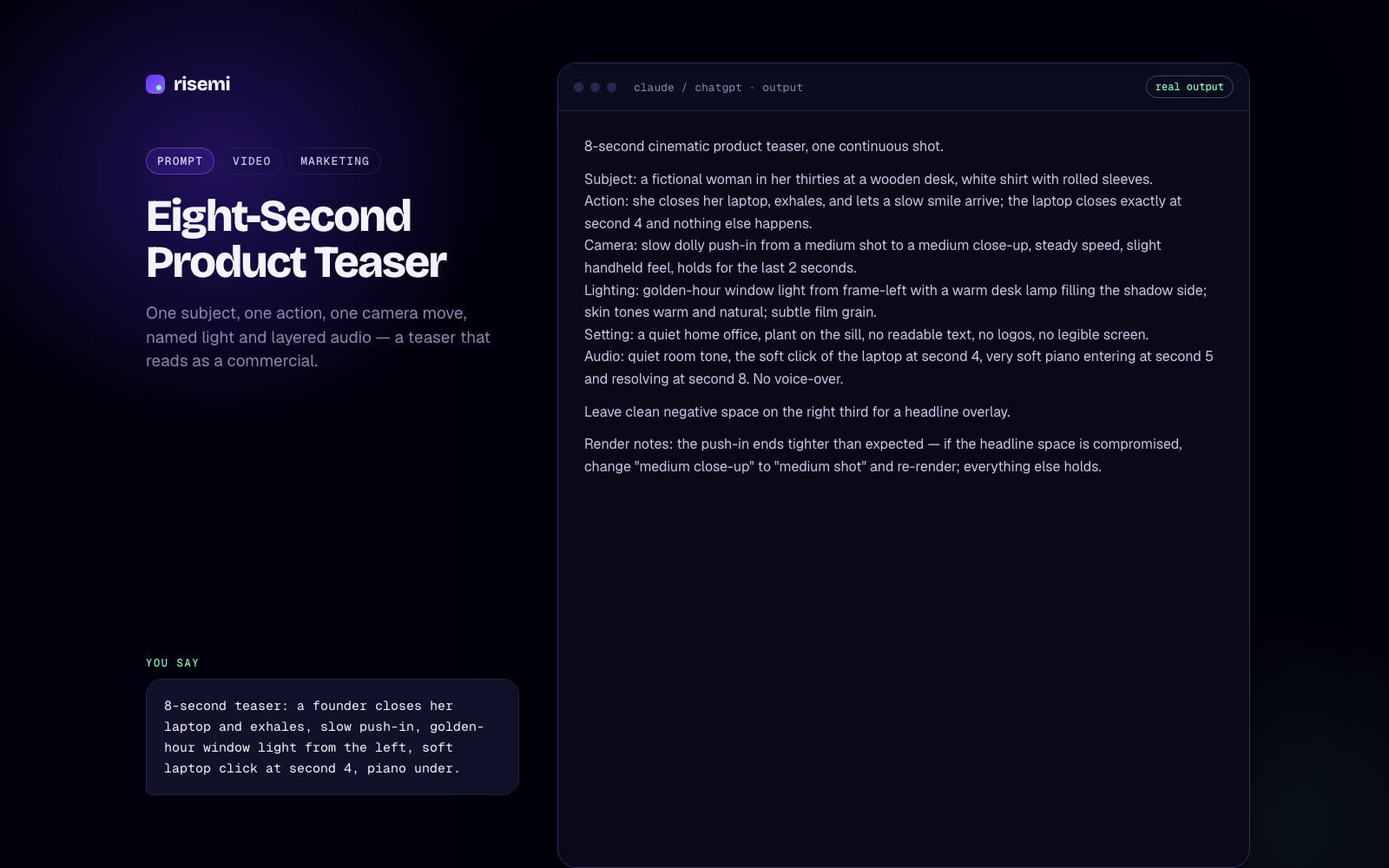
Character-Locked Scene for a Multi-Clip Video is a per-scene prompt that holds the same face, outfit and light across every clip, the usual weak spot of multi-clip AI video. Bring a Brand Still to Life animates an existing image with small motions and leaves everything else alone. Eight-Second Product Teaser builds a commercial-style clip around one subject and one camera move.

For longer pieces, Storyboard to Shot Prompts for Sora is a skill that turns a script into a beat sheet and per-shot prompts. It is tagged for Kling too, so its shot list carries over.

Kling skills

Beat sheet

| Beat | Purpose | What the viewer must get | Seconds |
|---|---|---|---|
| 1 | Hook | A reporter in the rain, recording a source who is trusting him with something | 4 |
| 2 | Problem / stakes | The recording is precious and private; the small device in his wet hand is what holds it | 4 |
| 3 | Reveal | Later that night, at home, he sets Fieldnote down and starts it working | 4 |
| 4 | Proof | The words appear on its own e-ink screen: transcribed on the device, no laptop, no cloud | 8 |
| 5 | Payoff + CTA | He has every word, privately; music enters; end line | 4 |

Storyboard table (shots 1–3 of 6)

| # | Sec (gen → use) | Framing | Camera move | Subject action | Dialogue / on-screen text | Audio / ambience | Continuity notes |
|---|---|---|---|---|---|---|---|
| 1 | 4 → 4 | Medium shot, eye level, over the source's shoulder (her back soft in frame-left foreground); he stands under the awning facing screen left | Slow handheld push-in | Holds Fieldnote out toward her at chest height; listens; gives one small nod | Source (on camera, from behind): "They said it would stay between us." | Location A bed; her voice close; rain on the awning | Location A. Faces screen left. Recorder in his right hand, red light on. Jacket zipped halfway, wet shoulders. |
| 2 | 4 → 4 | Extreme close-up on his right hand holding Fieldnote, the source's coat a soft blur beyond | Static | Rain beads on the graphite body; the red light glows steadily; his thumb shifts once on the edge | VO: "What they tell me stays with me." | Location A bed, close rain ticks on the device | Location A. Recorder points screen left. Screen pale grey and blank. Ends with recorder centred, for a match cut. |
| 3 | 4 → 4 | Medium close-up on the kitchen table under the pendant lamp | Static | His right hand enters from frame right and sets Fieldnote down, centred; his thumb presses the round button; hand withdraws | none | Location B bed; soft tap of the recorder on wood; one button click | Location and lighting change (B). Match cut from shot 2 on recorder position. Device dry now, red light off. |

[The full answer continues with shots 4–6 and a coverage alternate, the ten-line continuity block pasted word for word into all seven shot prompts, each prompt's first and last frame, and the stitch plan with voice-over script, caption placement and export settings.]
SkillTextPro
  • ChatGPT
  • Claude
  • Kling
  • +2
Video

Storyboard to Shot Prompts for Sora

Use it to turn a script or one-paragraph brief into a beat sheet, storyboard table, matching per-shot Sora 2 prompts and a stitch plan.

0 installs
$7.99
Kling prompts and packs

Scene 2 of 4 in a continuous short film. Use the attached character reference image.

Character (repeat verbatim in every scene prompt): a woman in her thirties, shoulder-length brown hair, navy blazer over a white shirt, warm intelligent expression — same face, same hair, same outfit, same build as the reference. No changes to wardrobe or hairstyle between scenes.
This scene: she pushes open the glass door of an empty office and walks in, slowing as she takes in the space, in a sunlit open-plan office at sunrise.
Camera: wide shot that begins a slow push-in as she enters.
Lighting: low golden sunrise through floor-to-ceiling windows — keep the colour temperature consistent with scene 1.
Ends on: her hand resting flat on a desk, centre frame — hold this frame for the final second so scene 3 can match-cut from it.
Audio: footsteps on hard floor and quiet office ambience; no music; no dialogue.
Avoid: additional people, mirrors, reflective surfaces, text, logos, any object she did not carry in scene 1.

Continuity check against scene 1: same blazer, same hair length, same warm temperature. Scene 3 will open on a hand on a different surface.
PromptVideoPro
  • Kling
  • Veo 3
Video

Character-Locked Scene for a Multi-Clip Video

A per-scene prompt that keeps the same face, outfit and light across every clip of a multi-clip video.

0 copies
$3.99
Image-to-video, 8 seconds, from the attached reference still.

Locked (must not change): the woman's face, pose and wardrobe; the café table, the window and every object on the table; the cream-and-sage palette; the camera angle and framing; the light direction from the window.
Motion (subtle, continuous): steam rising from the coffee cup; a few strands of hair lifting in a soft breeze; she turns one page of the book.
Timing: the page turn happens once, at second 3; steam and hair are ambient and barely visible.
Camera: static.
Audio: quiet café ambience with distant cups, one soft paper rustle at second 3. No music.

Result: the photograph breathes — the frame is identical to the still at second 0 and second 8; the page turn is the only event. Render 2 of 3 drifted the background chair; rendered again with the same prompt and kept render 3.
PromptVideoPro
  • Kling
  • Veo 3
Design

Bring a Brand Still to Life

Image-to-video that keeps face, background, palette and framing locked and adds three subtle motions.

0 copies
$3.99

Kling: common questions

How do I use these prompts in Kling?

For text-to-video, paste the prompt with your details filled in. For image-to-video, upload the starting still first, then paste the prompt.

How do I keep a character consistent in Kling?

Describe the character the same way in every clip and lock the outfit and lighting too. The Character-Locked Scene prompt does this per scene so a multi-clip video doesn't drift.

Kling or Veo for product video?

Both handle short product clips. The product teaser and brand-still prompts are tested in each, so you can run the same prompt in both and keep the result you prefer.

Guides

By agent or tool

By task

By role

By output